
What Is Android TV?
Last updated: October 2026
🕒 5 min read
Disclosure: This article does not contain affiliate or sponsored links. SignalVetted may still reference specific products or brands for informational purposes only.
To answer what is Android TV, this article relies on one source, Google’s Android TV Help page, and Google’s page gives no definition of Android TV, so we add none.
What the page does describe is what Android TV shows and does: its home screen and tabs, where its content comes from, what shapes the recommendations you see, and how ads, the Google Assistant, a Watchlist, home screen rows and apps fit in. We did not run any tests or use an Android TV device ourselves, so the facts below are what Google says. The page also does not say which TVs use Android TV or how it is built.
Table of Contents
What Is Android TV? What Google’s Page Says It Shows
The Home Screen
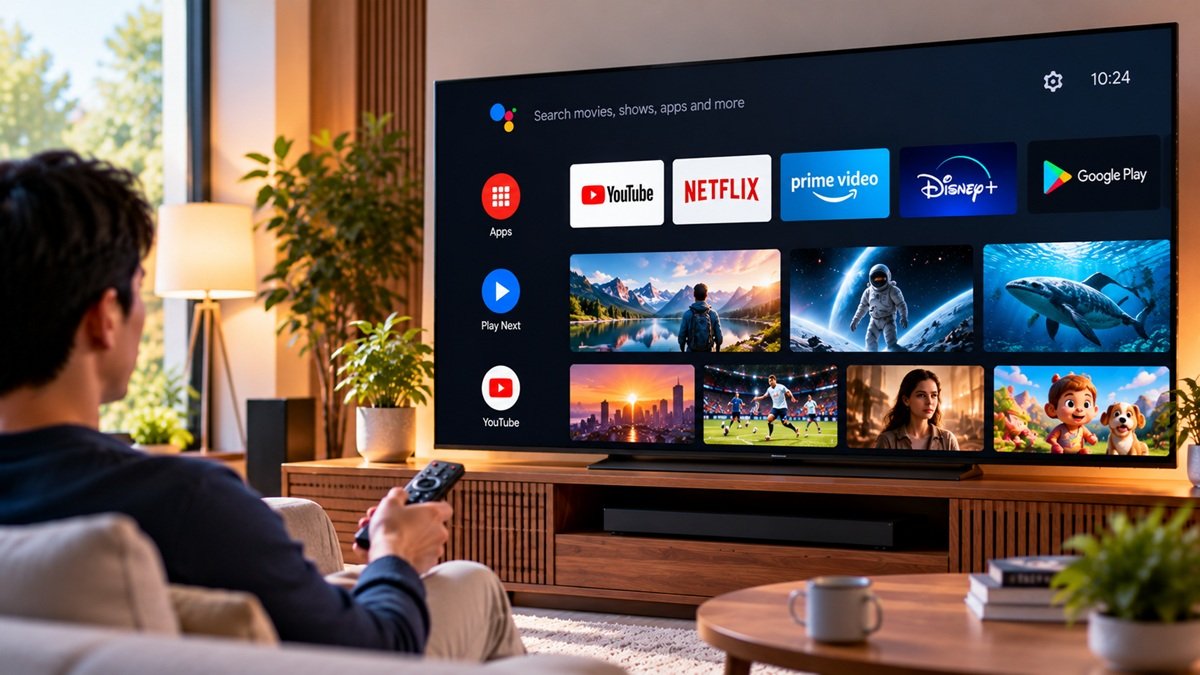
According to Google’s page, you can browse for shows and movies to watch on the Android TV home screen. It says you will find shows and movies you have started, suggested videos and personalized recommendations there.
The Tabs
Google says there are several tabs at the top of the Android TV home screen. It lists Search, Home or For You, Live, Discover, Free, Shop, Apps and Settings, and describes each of them.
Google describes Search as the place to speak or type your search. Home or For You is where Google says you can quickly find suggested content, apps you have downloaded, and movies and shows you have not finished. It describes Apps as holding the apps you have downloaded along with suggested apps, and Settings as the place to change settings for your account or your device.
Google marks Live, Free and Shop as subject to availability. Discover offers personalized recommendations based on watch history, interests and new trends, and Google says you can find it if you live outside the US. Free offers “Free with ads” content from various providers, again with recommendations based on watch history and interests, and Google says you can find it if you live in the US.
Where Android TV Content Comes From
Google’s page says content on Android TV comes from third-party partners, such as app developers and movie studios, and from Google itself. Partners sell or provide some content directly, or through Google when Google acts as an agent for the partner. Google sells or provides other content directly.
App developers can submit apps to the Play Store, which you can then download to your Android TV, according to Google. It adds that apps must follow the general Play Store app guidelines and its specific app guidelines, which Google names for Android TV and one other product.
Google also says partners, including app developers, can generally remove their content from Android TV and their apps from the Play Store. Google may also remove content from Android TV and apps from the Play Store on its own, for example if it learns that something violates its content policies or runs afoul of applicable laws.
What Shapes What You See
Google’s goal, as its page puts it, is to present content that it thinks you will enjoy and purchase. Google says your individual layout, the sequence of lists, and the recommendations of content and apps may be influenced by a set of criteria, all subject to availability. You can read the full explanation on Google’s Android TV Help page.
The criteria Google lists are where you live and the language you choose for your device, content popularity, content quality and relevance, the streaming services you selected, your prior interactions, the editorial value of content, the economic viability of the platform and contractual obligations to Google’s partners, market-specific requirements, and your type of device. Google’s page does not rank these or say how much weight each one carries.
Ads, the Assistant and Your Watchlist
Google says Android TV sometimes serves advertisements, labeled as advertisements, for content available on third-party apps, on Android TV or on Play. Google is paid by the advertiser for these. In some cases, partners may share advertising revenue with Google, or Google may display advertisements in its partners’ apps.
If you activate the Google Assistant on your Android TV device, Google says you can search for content and apps with it.
Google’s page also says you can add shows or movies you want to watch later to a Watchlist. Those titles show up as a row in the Discover tab for users outside the US and in the Home tab for users in the US. Google adds that once you add content to your Watchlist, you can find it on any device where you log in.
Rows and Apps
Google says you can add, remove and reorder channel rows on the Android TV home screen, with a caution that not all Android TVs have these settings.
Google’s page also describes a Favorite Apps row, where you can mark apps as favorites and take them off again. According to Google, you can reorder and remove apps as well.
Fees and Reviews
Google’s page says Google collects a service fee based on sales of apps, movies, shows and games on Google Play, or within apps and games that use Google Play’s billing system. The page describes this under Google Play purchases and does not say whether it applies to Android TV specifically. It also says that what you pay, to buy or rent, appears on the item’s details page and in the purchase dialog before you complete the purchase, and that you also receive an email receipt after the purchase.
Google says Android TV includes one or more reviews of the content on its platform, drawn from a list of review sources that Google’s page names. It also states that Google does not verify reviews of movies and TV shows.
What Google’s Page Does Not Tell You
In the text of Google’s page that we reviewed, several things are missing. It gives no definition of Android TV or description of what kind of software it is. It does not list which TVs or brands use Android TV, and it does not say how the software is built, or cover its versions or history. Those answers are not in the text we reviewed, and this article does not fill the gap.
If you’re also looking into Google TV, our explainer on what Google TV is covers it separately.
Frequently Asked Questions
What Is Android TV?
Google’s page does not define it, and we do not add a definition. What the page says is that the Android TV home screen lets you browse shows and movies, find ones you have started, and see suggested videos and personalized recommendations, with tabs at the top that Google lists as Search, Home or For You, Live, Discover, Free, Shop, Apps and Settings. Google marks Live, Free and Shop as subject to availability.
Where does Android TV content come from?
According to Google’s page, from third-party partners such as app developers and movie studios, and from Google itself. App developers can submit apps to the Play Store, which you can then download, according to Google. Google says partners can generally remove their content and apps, and that Google may do so as well.
Does Android TV show ads?
Google’s page says Android TV sometimes serves advertisements, labeled as advertisements, for content on third-party apps, on Android TV or on Play, and that Google is paid by the advertiser.

Nridi
Editor, SignalVetted
This article does not report independent product testing.
✅ Based on Google’s Android TV Help page, “How Google TV & Android TV work”.